This was sourced from the
original blog record by one of the developers tasked with making a Game Gear port of Ecco.
Balázs Pápai is indeed credited in the GG port, I am not sure who 'Piglet' is in the startup screen though.
Once again, I cannot thank
Benily enough for finding this treasure in the Hungarian corners of the interwebs!
Magic Tools
I found an old program back home. It took me a lot of effort and sacrifice to revive it, but it was worth it. The background to the matter is that even in the early days I’d make a living from game development and we ported Ecco the Dolphin, a rightfully successful game developed by Novotrade, to Sega's Game Gear console. In this context, porting would often mean reworking part of the idea and story: code had to be rewritten, graphics redesigned, nothing would be suitable from the original program. What you need to know about the Game Gear development is that although we received some development systems from America, most of it was produced by our company, as were the programs needed for that, which in this case was made by me and my brother. This program was the main working tool of graphical artists; the worlds were created in it. It was DOS-based, since Windows only had a trace presence back then. Good times.
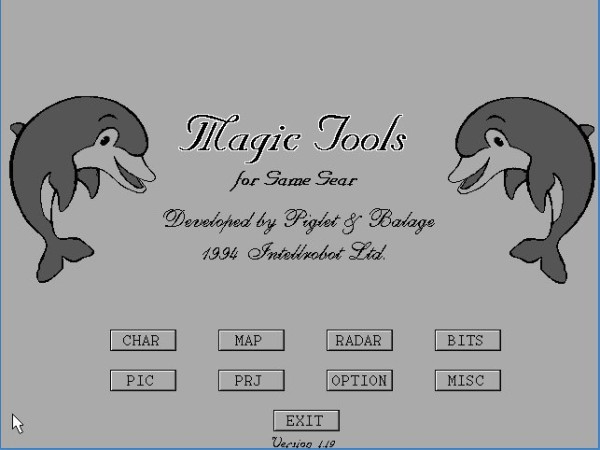
This was the main menu of the program. Here you’d choose the functions you wanted to use. The worlds in the game consisted of characters. The characters were organized into tiles, and these tiles made up the world. Of course, a character could be used more than once in a tile, because that also saved time. The program also had to move and reload the characters, which all takes time, and there is very little of that in a game.
The image shows the character and metatiles editor. The editing was determined by the capabilities of the machine: two palettes, characters of 8x8 pixels that 8x8 tiles are built of, 8 having been chosen for practical reasons, can also be set up on this page.
The worlds were built of metatiles that were assembled from characters. Of course, a metatile could be used multiple times within a world, and in fact, it had to be, because you have to save resources everywhere! The fewer you use, the faster the game will run. At the same time, it also has to look good - this contradiction was resolved by our talented graphic designers.
Metatiles alone weren’t enough to build a complete world in the game: we also had to tell the program where the main character could move and where he couldn't. What counts as air, in which he can't swim but can take in oxygen, and where he can't pass through and where he gets hurt. We called these
"excluders", when we told each character within the metatile:
A was an obstacle,
. was water,
L was air, and
B was what hurt him.
The dolphin swims swiftly in its world, guided by the excluders, but a dolphin knows something else. He can make a sonar map of the world around him. The sonar map is also built up from metatiles and a separate program section was used to create this. There were two colors for the rock, and a separate color for the water, air, and perhaps the offending objects. I also programmed the dolphin's sonar in the game.
The program had other functions that I have no idea about. Since I have the source code, I could actually see what they were and for what purpose, but even though I already have a Game Gear, I don't have any of the development systems for it, so I can't try uploading or downloading a world I designed to the device.
Metatiles could also be created automatically from a picture that would be split into characters, and perhaps this could have helped with making them. The development of the program was largely based on the ideas and needs of working graphic designers, so perhaps an artist working on the project could recall this better than I can.
The work was organized into projects, a project file containing characters of a given world, metatiles, and worlds built from them. These projects could be managed in this menu.